SecurityXploded.com
Firefox Autocomplete Spy : Free Tool to View or Delete Autofill data from Firefox browser
Firefox Autocomplete Spy

Version: 3.0

See Also
 
Contents
 
About
Firefox Autocomplete Spy is the free tool to easily view and delete all your autocomplete data from Firefox browser.
Firefox stores Autocomplete entries (typically form fields) such as login name, email, address, phone, credit/debit card number, search history etc in an internal database file.

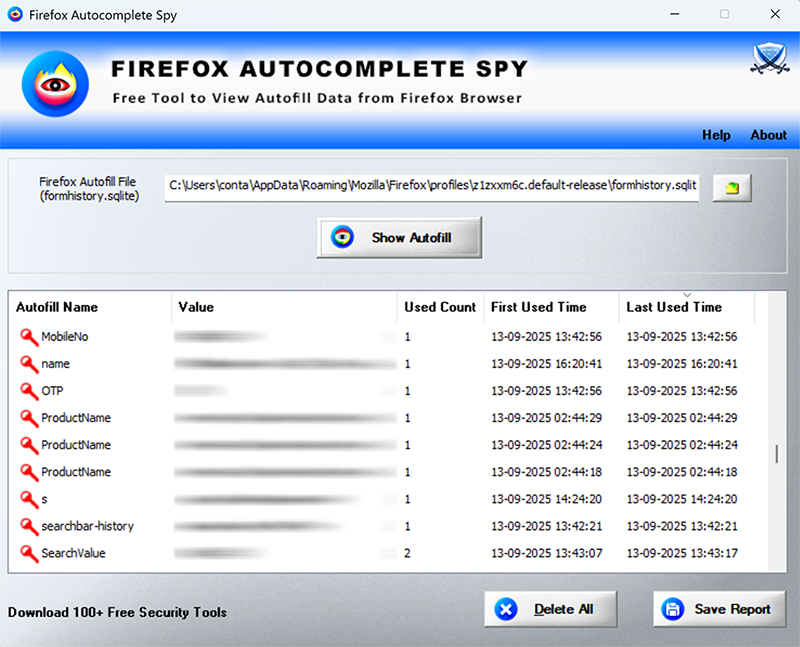
'Firefox Autocomplete Spy' helps you to automatically find and view all the Autocomplete history data from Firefox profile location. For each of the entry, it display following details,

  • Autofill Name
  • Value
  • Total Used Count
  • First Used Time
  • Last Used Time

You can also use it to view from history file belonging to another user on same or remote system. You can also view autofill data of similar Mozilla based applications like Thunderbird, Postbird, SeaMonkey etc

Firefox Autocomplete Spy is fully portable and works on both 32-bit & 64-bit platforms starting from Windows Vista to Windows 11.

 
Features
  • Instantly view all the autocomplete data from Firefox form history file
  • On startup, it auto detects Autocomplete file from default profile location
  • Sort feature to arrange the data in various order to make it easier to search through 100's of entries.
  • Delete all the Autocomplete data with just a click of button
  • Save the displayed autocomplete list to HTML/XML/TEXT/CSV file
  • Easier and faster to use with its enhanced user friendly GUI interface
  • Fully Portable, does not require any third party components like JAVA, .NET etc
  • Support all Windows platforms starting from Vista to Windows 11.
 
 
Firefox Autocomplete File Location
Firefox stores Autocomplete data in a file called 'formhistory.sqlite' within each of the profile folder,
C:\Users\Administrator\AppData\Roaming\Mozilla\Firefox\Profiles\<profile_name>
This file is stores in SQLite database format and contains various fields including field name, value, used count, date etc
 
 
How to Use?
Firefox Autocomplete Spy is easy to use with its simple GUI interface. 

Here are the brief usage details
  • Launch FirefoxAutocompleteSpy on your system
  • By default it will automatically find and display the autocomplete file from default profile location. You can also select the desired file manually.
  • Next click on 'Show Autofill' button and all stored Autocomplete data will be displayed in the list as shown in screenshot 1 below.
  • If you want to remove all the entries, click on 'Delete All' button below.
  • Finally you can save all displayed entries to HTML/XML/TEXT/CSV file by clicking on 'Export' button and then select the type of file from the drop down box of 'Save File Dialog'.
 
Screenshots
 
Release History
Version 3.0 :  8th Jan 2026
New 2026 release supporting autofill data recovery from latest Firefox v140+. Fully renovated GUI interface with new icons. Improved HTML report.
 
Version 2.0 :  8th Sep 2016
Mega edition with the support for Windows 10 version. Added more features like right click context menu & fixed the sizing problem with higher resolution computers.
 
Version 1.0 :  27th May 2015
First public release of FirefoxAutocompleteSpy
 
 
Download
FREE Download Firefox Autocomplete Spy v3.0

License  : Freeware
Platform : Windows 11,10,8,7,Vista (32-bit/64-bit)

Download
 
See Also